
TL;DR: A Substack pledge is a reader's promise to pay once you turn on paid subscriptions. They pick a plan and enter card details, and nothing is charged. When you connect Stripe and enable payments, pledges convert to paid subscriptions automatically, and each reader gets an email telling them.
| Question | Answer |
|---|---|
| Who can collect pledges? | Free publications with suggested pricing, before payments are set up |
| Minimums | Pledges must be higher than $5/month and $30/year, and the founding price higher than the annual pledge |
| Where do I see them? | Stats, then Pledges: the count, potential annualized revenue, and reader notes |
| Is the reader charged? | No, not until you turn on paid subscriptions |
| When I turn on paid | Pledges convert automatically and can take up to an hour to show |
| Price lower than the pledge | The pledge converts at your lower price |
| Price higher than the pledge | Accept pledges at the pledged price, or Substack emails the reader to subscribe at the new price |
| How does a reader cancel? | Settings, then Subscriptions, open the publication, then "To cancel your pledge, click here" |
Checked against Substack Help on 9 Nov 2026.
You open your Substack dashboard and see a small notification: three readers have pledged $8 a month to support your newsletter. You never turned on paid subscriptions. Nobody charged them anything.
That's Substack Pledges, a feature that's been sitting on by default on most publications since 2022, quietly collecting signal that most writers never look at. It's a promise to pay later, a raised hand from a reader. How you read it changes what you do next.
This guide walks through what pledges actually are, the default settings worth checking before you forget about them, what a pledge is actually worth once Substack and Stripe take their cut, how to read a pledge count as a real signal instead of a vanity number, and when the data suggests you should actually flip the switch on paid subscriptions.
Table of Contents
What does a pledge mean on Substack?
A Substack pledge is a reader's promise to become a paid subscriber if and when you turn on paid subscriptions. The reader chooses a monthly, yearly, or founding amount and enters payment details. Substack does not charge them for making the pledge. If you never enable payments, nothing is charged.
Pledge vs subscription
A pledge sits alongside a free subscription. The reader stays free until you enable payments and the pledge converts into a paid plan. A paid subscription is the recurring charge that begins after that conversion, or after the reader accepts a higher price when your new plan is above what they pledged.
What happens when you turn on payments?
When you set up payments and connect Stripe, Substack converts pledges into recurring paid subscriptions. Converted subscriptions can take up to an hour to appear on your Subscribers dashboard, and each pledged reader gets an email. If your new prices are lower than the pledged amounts, pledges convert at the lower price. If your prices are higher, you can accept pledges at the pledged price, or Substack emails the reader so they can subscribe at the new price.
What Substack Pledges Actually Are
A pledge is a reader's promise to pay for your newsletter once you turn on paid subscriptions. They pick an amount, enter a card, and can write an optional note about why they're pledging. Nothing gets charged the day they do this. The card sits on file, waiting on a decision that belongs entirely to you.
Substack's own explanation is straightforward: pledges let readers commit to a monthly or yearly subscription before a writer has activated paid subscriptions at all. It exists to test demand without asking anyone to actually hand over money yet, and without forcing the writer to commit to a price before they've seen any evidence people will pay it.
The reader-side mechanic
If a reader is logged into Substack and your publication only has free subscriptions enabled, they'll see a "Pledge your support" button in place of the usual "Subscribe" button, sitting right where a paid prompt would normally live. Clicking it walks them through picking a monthly or annual amount, entering payment details, and confirming. From their side, the flow feels a lot like subscribing for real. The difference is invisible to most readers unless they read the fine print: no charge happens until the writer turns on paid subscriptions.
Readers can pledge to as many publications as they want, and pledging doesn't require them to unsubscribe from anything or change their existing free subscription in any way. It runs alongside the normal reading experience without interrupting it.
Why Substack built it this way
Most writers who want to charge for their work face the same problem before they ever set a price: they don't know if anyone will pay, and picking a number out of the air feels like a guess with real consequences attached. Pledges solve that without forcing a binary decision. A writer can watch pledges accumulate for weeks or months, get a real number attached to real people willing to pay, and only then decide whether turning on paid subscriptions is worth the jump.
It also solves a quieter problem: writers who are scared to ask for money at all. A pledge button asks the question passively, in the background, without the writer having to write a single sentence pitching a paid tier. Some of the most useful pledge data comes in from publications where the writer never mentioned pledges once.
Practical rule: treat your pledge count as a demand signal. It tells you who's willing to pay, and billing will show you what you actually collect.
How the Pledge Flow Actually Works
What happens to a reader's card
A pledge asks the reader for payment details but doesn't charge them. Nothing is billed for as long as the writer leaves paid subscriptions off, and if the writer never turns paid on, nothing happens at all. Readers who already pay another publication while logged in get their card details pre-filled. A reader can cancel a pledge at any time from their own account settings, under Subscriptions, and nothing about a pledge locks them in (Substack Help: Can I pledge a Substack?).
What happens when you flip on paid
This is the part that catches writers off guard: pledges convert automatically, with no second confirmation step from the reader. When you connect Stripe and turn on paid subscriptions, pledges become paid subscriptions, and they can take up to an hour to appear on your Subscribers dashboard. If your price is lower than what a reader pledged, the pledge converts at your lower price. If your price is higher, the pledge doesn't convert on its own: you can accept it at the pledged price, or Substack emails the reader, who can subscribe at the new price from that email (Substack Help).
That single detail should shape how a writer sets pricing at launch. Setting the real subscription price above what most pledges came in at means either accepting those pledges at the lower pledged price or waiting on each reader to answer Substack's price-change email, and some of that already-committed revenue never arrives.
What happens if your price is higher than the pledge?
If your paid price ends up higher than a reader's pledge, the pledge does not convert on its own. Substack shows you the mismatched pledges, and you can accept them at the pledged price. If you leave that off, Substack emails each reader about the new price and they can subscribe at the higher rate.
The switch is called "Accept pledges at any price", and Substack shows the number of mismatched pledges and their amounts when you set up payments. Substack's own example: pledge tiers at $8 a month and a launch price of $10 a month means the pledge won't turn into a $10 subscription by itself (Substack Help).
Practical rule: decide before launch whether you'd rather keep every pledger at their pledged price or ask them to pay your new one. Accepting at the pledged price keeps the most paying readers on day one.
The Default Settings Most Writers Never Check
Pledges are on by default for free Substack publications with suggested pricing, as long as payments aren't set up yet. Most writers never open the settings page to look at what the default pricing actually is, which means every pledge collected so far has been priced by Substack's defaults.
| Setting | Default value | Platform minimum |
|---|---|---|
| Monthly pledge amount | $8/month | $5/month |
| Annual pledge amount | $80/year | $30/year |
| Pledges enabled | On by default | Can be toggled off |
| Card charged at pledge time | No | N/A |
If a publication has never touched this setting, every reader who has pledged so far did so at Substack's default $8/$80 pricing. That's a fine outcome if $8 a month is roughly where the writer would have priced themselves anyway. It becomes a real problem for a writer planning to launch at $15 or $20, because a pile of $8 pledges won't turn into $15 subscriptions by themselves. The writer has to accept them at $8 or wait for each reader to answer Substack's price-change email, and usually finds this out on launch day.
Practical rule: check pledge pricing before there are any pledges worth caring about. Changing the amount later doesn't retroactively change what existing pledgers already agreed to.
Turning Pledges On, Off, or Adjusting the Amount
Making a change takes under a minute. From a publication's Settings page, scroll to the Payments section and find "Allow readers to pledge subscriptions." From there, a writer can:
- Toggle pledges off entirely, which removes the pledge prompt from the publication and every post.
- Adjust the suggested monthly and yearly pledge amounts to match whatever price they'd actually charge.
- Leave pledges on at the default and revisit the amount later, understanding that existing pledges keep whatever price they were made at.
Some writers turn pledges off on purpose. If a publication isn't planning to monetize for a long time, or the writer would rather free readers never see a payment prompt at all, switching pledges off removes the button entirely and reverts to a plain "Subscribe" button. Substack's guidance on turning off paid subscriptions covers the related settings for writers who've gone further and want to unwind monetization completely.
Struggling to stay consistent on Substack?
Batch and queue your Substack Notes in minutes, track which Notes convert subscribers, and grow without burning out.
Reading Your Pledge Count as a Signal
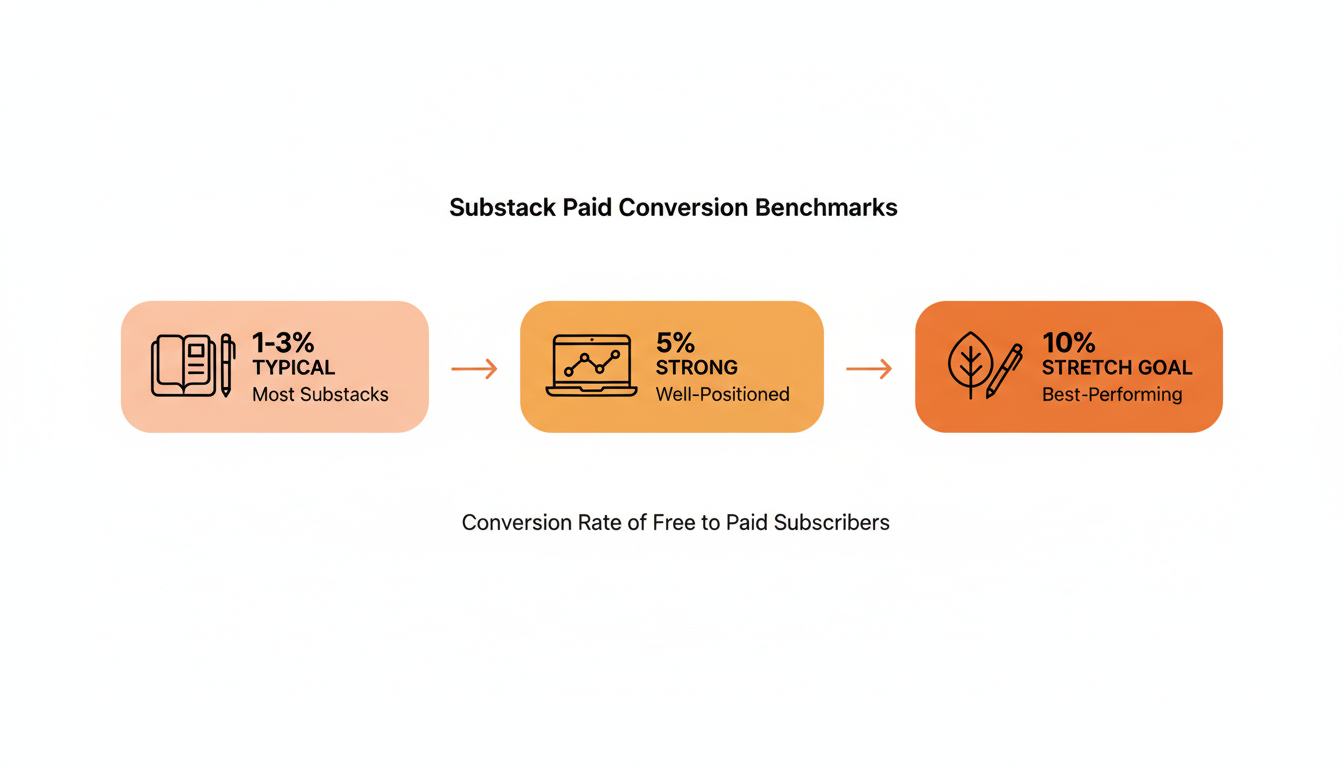
A pledge count of 20 out of 500 free subscribers isn't automatically good or a warning sign on its own. It needs a comparison point. Actual paid-conversion numbers, measured once subscriptions go live across many publications, tend to land in a fairly wide range. One analysis of publisher data from Really Good Business Ideas put typical conversion in the 1-3% range, with 5% considered a strong result and 10% treated as an outlier ceiling that most publications, even successful ones, never reach.
Pledges tend to run hotter than eventual paid conversion, since pledging costs a reader nothing today and carries none of the friction of an actual charge. Use that gap deliberately. A pledge rate sitting below 1% of the free list is a real signal to keep building trust and consistency before touching the paid toggle at all. A pledge rate well above 3% usually means there's room to price higher than the $8 default, or to move faster than originally planned, because the demand is already sitting there waiting to be collected.
Worth tracking alongside the raw count: how the pledge rate moves after specific posts. A spike in pledges after a particular piece is one of the clearest signals available for which topics or formats a publication's paid tier should actually be built around.
When to Actually Flip the Switch on Paid Subscriptions
Substack's own advice on timing leans toward not overthinking this decision: most writers benefit from turning on paid subscriptions earlier than they feel ready to, because the biggest driver of conversion tends to be total audience size and publishing consistency.
That guidance holds up, but three things are worth having in place first. A publishing history long enough that new readers can tell what they'd actually be pledging toward. At least a small base of pledges that validates the planned price point rather than guessing at it cold. And a clear, one-sentence answer to what paying subscribers get that free readers don't. None of these need to be impressive by any outside standard. They need to exist in a form the writer can point to.
Practical rule: don't wait for a "big enough" pledge count before turning on paid subscriptions. Wait until there's a one-sentence answer to what a paying subscriber gets that a free one doesn't.
What a Pledge Is Actually Worth After Fees
A pledge total looks like clean revenue sitting in a dashboard. It isn't. Once paid subscriptions go live and pledges convert, Substack and Stripe both take a cut before any of it reaches the writer, and the gap between the pledged amount and the actual deposit surprises a lot of first-time paid writers.
Per Substack's own fee breakdown, the platform takes 10% of every transaction. On top of that, Stripe charges a 2.9% + $0.30 credit card processing fee, plus a separate 0.7% billing fee for recurring subscriptions. None of these are hidden exactly, but none of them show up on the pledge screen a reader sees either.
| Pledge amount | Substack fee (10%) | Stripe fees (2.9% + $0.30 + 0.7% billing) | Approx. take-home |
|---|---|---|---|
| $8/month | $0.80 | $0.59 | ~$6.61 (83%) |
| $15/month | $1.50 | $0.84 | ~$12.66 (84%) |
| $80/year | $8.00 | $3.18 | ~$68.82 (86%) |
| $150/year | $15.00 | $5.70 | ~$129.30 (86%) |
The pattern holds across price points: a writer keeps roughly 83 to 86 cents of every pledged dollar, with monthly pledges losing slightly more to fees than annual ones because the flat $0.30 Stripe fee hits smaller transactions harder, proportionally, than larger ones.
Practical rule: when deciding whether a given pledge count justifies turning on paid, run the math on the after-fee number. A hundred pledges at $8 a month is closer to $661 a month than $800, and our guide to how Substack payouts work covers when that money reaches your bank.
Pledges vs Founding Member Tier vs Paywall Ratio
Pledges are one of three separate monetization levers Substack gives writers, and it's easy to conflate them because they all touch the same Payments settings page. Each one solves a different problem and matters at a different point in a publication's life.
| Lever | What it does | When it matters |
|---|---|---|
| Pledges | Lets free readers pre-commit to a price before paid subscriptions are live | Before a writer has turned on paid subscriptions at all |
| Founding member tier | An optional premium tier priced above the standard paid subscription, for the most committed supporters | After paid subscriptions are live and there's an established paid base |
| Paywall ratio | How much regular content sits behind the paywall versus stays free | Ongoing, for as long as paid subscriptions exist |
Writers sometimes try to skip straight to a founding member tier or an aggressive paywall ratio without ever validating demand through pledges first. That sequencing usually backfires. Pledges are the cheapest, lowest-risk way to find out if anyone wants to pay at all, before deciding how much of the work to lock away or how to price a premium tier on top of a subscription base that doesn't exist yet.
Common Mistakes Writers Make With Pledges
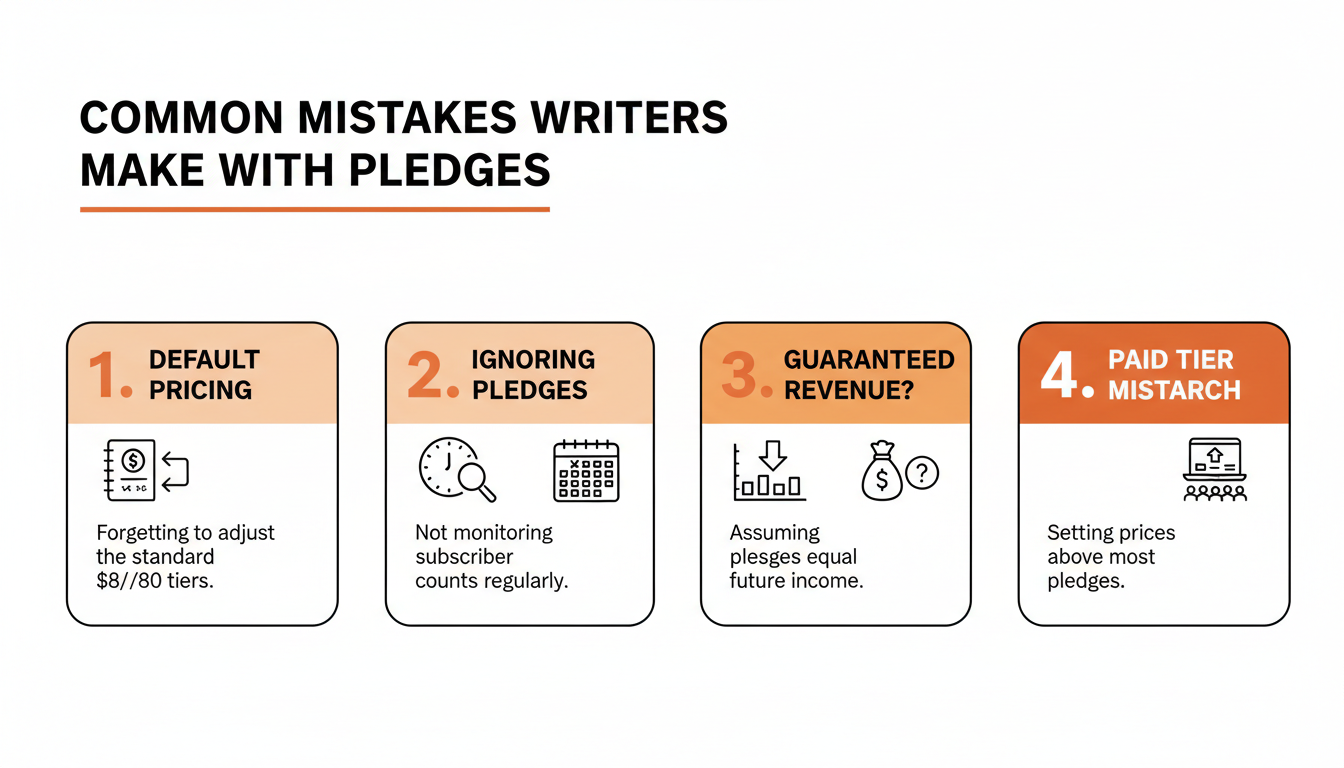
The same handful of mistakes show up repeatedly across writers who eventually reach out to Substack support confused about why their pledges "disappeared" or didn't convert the way they expected at launch.
Never checking the default pricing is the most common one, covered in detail above. Ignoring the pledge count for months at a time is close behind. It doesn't need daily attention, but a monthly glance gives a running read on demand instead of a surprise number showing up the day a writer finally decides to monetize. Treating pledge totals as guaranteed future revenue causes real planning problems, since some pledgers change their minds, close accounts, or let cards expire in the gap between pledging and eventual conversion. And pricing paid subscriptions above where most pledges came in wastes the entire signal pledges exist to provide in the first place.
Consistency matters here more than most writers expect. Publications that go quiet for weeks tend to see pledges stall out at whatever number they hit before the gap, since a pledge is a bet on a writer's future output. A Substack Notes scheduler like WriteStack helps keep a publication visible between longer posts, which keeps new readers arriving steadily and gives existing pledgers a reason to stay pledged instead of quietly canceling. Writers who use WriteStack's note generator to turn a single post into a week of Notes tend to keep that visibility up without adding writing time, which matters more for pledge volume than any single high-performing post ever will. And for writers trying to figure out which subscribers are worth a direct, personal thank-you before flipping on paid, WriteStack's fan tracking surfaces the most engaged readers on a publication, often the same people who show up first in the pledge list.
Frequently Asked Questions About Substack Pledges
What does pledge mean on Substack?
A pledge is a free subscriber's promise to become a paid subscriber if you turn on payments. Pledges are on by default for free publications with suggested pricing, and readers can pledge to a monthly, yearly, or founding plan, or choose No pledge.
What is a founding pledge amount?
It's the suggested price for the founding plan, the top tier a reader can pledge to. Substack requires it to be higher than your annual pledge amount, and you can change it in Settings under Payments.
Are pledges charged right away?
No. Readers enter payment details to complete a pledge, and their card is only charged if you turn on paid subscriptions. If you never turn on paid, nothing happens.
What happens to pledges when I turn on paid subscriptions?
Once you connect Stripe and enable payments, pledges convert to paid subscriptions, and they can take up to an hour to show on your Subscribers dashboard. If your prices are lower than what readers pledged, they convert at the lower price. If your prices are higher, you can accept pledges at the pledged price, or Substack emails each reader an invitation to subscribe at the new price.
Can readers cancel a pledge?
Yes. The reader opens their Substack Settings, goes to Subscriptions, opens your publication, and clicks "To cancel your pledge, click here".
How do I turn pledges off or change the suggested amount?
Open your publication's Settings, go to Payments, and use the toggle next to Allow readers to pledge subscriptions. In the same section you can change the suggested monthly, yearly, and founding prices. Pledges must be higher than $5 a month and $30 a year.
Where can I see my pledges?
Open your Stats page and click Pledges. You'll see the number of pledges, the potential annualized revenue from them, and any notes readers sent with their pledge.
Can I turn off pledge notification emails?
Yes. Substack emails you each time someone pledges. To stop that, open the Notifications section of your publication Settings and toggle off "New pledged subscription".
Pledges are a small feature that most writers set once and forget entirely. Read correctly, and checked on a real schedule, they're one of the few honest previews Substack gives a writer of what their paid launch will actually look like before a single dollar changes hands.