
A Substack free trial gives a reader paid access to one publication for a set number of days. You enter a card to start, Substack charges only when the trial ends, and you can cancel before then without paying. There is no site-wide Substack trial. Each writer chooses whether to offer one.
Writers: jump to How to Turn On Free Trials.
Table of Contents
Substack Free Trial: Quick Answers
Are you charged right away for a Substack free trial? No. You pick a plan and enter a card, but Substack only charges it when the trial ends. Cancel before then and you pay nothing.
How long is a Substack free trial? The paywall trial is 7 days. Writers can also create a free trial special offer with its own link and length.
How do you cancel a Substack free trial? Open the publication's Manage subscription page in your Substack settings and cancel the plan. If the trial ends within 10 days, access stops right away and you aren't charged.
Does Substack have one free trial for every publication? No. Trials are set per publication, and only some writers turn them on. You can run trials with several publications at once, but you can't redeem a second trial with the same publication on the same account.
How does a writer add a free trial? In Settings, open Payments and switch on "Offer 7-day free trials in paywall", or create a special offer and choose "Free trial" under Terms.
Based on Substack Help, checked 9 Nov 2026.
What a Substack Free Trial Actually Does
A Substack free trial gives a reader full paid access to one publication for a set number of days before their card is charged. During the trial, the reader can open your paid posts and your archive, the same as a paying subscriber. Substack's Help puts it plainly: "Free readers will be like paid subscribers and can access your paid posts and archives."
Substack supports two flavors of this. The first is a blanket toggle on your paywall that offers every reader who hits a locked post a 7-day trial alongside the option to pay now. The second is a custom special offer you build yourself, with its own name, its own description, and its own link that you can drop into a post, an email, or a Note.
See how WriteStack's Note Generator can turn a trial announcement into a week of Notes
Practical rule: a free trial helps a reader who already likes your writing and hesitates at the price. A reader who isn't sure your writing is worth reading regularly needs better free posts first.
Three more things a trial leaves unchanged. Your free list grows the usual way, since a reader who starts a trial is already a free subscriber or becomes one the moment they enter an email. The price stays the same, because a trial moves only the date of the first charge. And the value of your paid tier still has to carry the decision on the last day. If a reader would have said no on day one, they usually still say no on day eight.
For Readers: How a Substack Free Trial Works
If you just saw "7-day free trial" on a Substack paywall, here is what happens next. The trial covers that one publication only. Substack's Help says trial access to every paid post on Substack "is not available."
How to start a Substack free trial
- Open a paid post with a trial offer, or open the trial link the writer shared.
- Choose a monthly, yearly, or founding plan.
- Enter your payment details to redeem the trial. Substack does not charge the card until the trial ends.
- Read the paid posts and archive on the web and in the app for that publication.
- Cancel before the billing date if you do not want the plan to convert.
Are You Charged Right Away?
No. Substack asks for your card when you start the trial and charges it when the trial ends. In Substack's words: "Once the free trial is over to that publication, you'll be automatically charged for the subscription. You can choose to cancel your free trial before the billing date."
After that first charge, the plan keeps renewing. Monthly and annual plans renew on their own, and annual subscribers get a reminder email about a week before renewal.
How to Cancel a Substack Free Trial
Cancel on the web from your Substack account:
- Go to substack.com/settings and, under Subscriptions, select the publication.
- On the Manage subscription page, scroll to Account actions and click the link next to "To cancel your paid subscription, click here".
- On the Cancel or Pause Subscription page, click Cancel subscription, pick a reason, and confirm.
What happens next depends on how much of the trial is left:
| Your situation | What happens when you cancel |
|---|---|
| Trial ends within 10 days | Access ends right away. You see "Your subscriber benefits will end immediately." No charge. |
| Trial has more than 10 days left | Access runs to the trial's end date, then the trial doesn't convert. No charge. |
| Trial already converted to paid | You keep paid access until the end of the period you paid for. Cancelling doesn't give a refund. |
| Subscribed in the Substack iOS app | Cancel through the Apple App Store. |
Source: Substack Help, checked 9 Nov 2026.
The paywall trial is 7 days long, so cancelling one of those always ends it on the spot. If you changed your mind, you can undo a cancellation on a paid plan by clicking Set to renew on the account page before the end date.
Charged After a Trial? Refunds
If a trial converted because you forgot to cancel, ask the writer first. Substack's refund policy says refunds "are ultimately at the discretion of the Publisher, and refund requests should be made to them directly."
Substack also steps in itself in a few cases. Its policy says it will issue a refund if you contact Substack support within 7 days of the payment, unless you claimed a subscriber perk or the writer marked the subscription as non-refundable. After 7 days, the decision goes back to the writer. Substack also refunds when a publication is dormant: no posts for at least 1 month after payment on monthly plans, or at least 6 months on yearly plans. Substack notes refunds can take up to 10 business days to show on your statement. Subscriptions bought in the iOS app go through Apple, and Apple decides those refunds.
Tip: cancel first, then ask for the refund. Cancelling stops the next renewal, and the refund request covers the charge you already paid.
Who a Free Trial Actually Works For
Not every newsletter benefits equally from this feature, so be specific about where it earns its keep.
Newsletters with a clear, recurring paid format tend to do best with trials: a weekly deep-dive, a members-only roundtable, a paid Q&A thread. The reader experiences a full cycle of the thing they're being asked to pay for, so the decision at the end of the trial is an informed one.
Newsletters where the paid tier is mostly "the same writing, but more of it" tend to see weaker results. A free reader can already guess what the trial holds from your free posts, so the trial only pushes back the cancel-or-pay decision without giving the reader anything new to decide with.
Very early newsletters, with a few hundred subscribers or fewer, often get more from putting that energy into distribution. A trial only works on people who have already found you. If too few people are finding you, a paywall lever won't fix that.
Practical rule: before adding a trial, write down the specific paid content a trial subscriber would see in their first week. If you can't name three concrete pieces, the paid tier needs work before the trial does.
How to Turn On Free Trials
The Publication-Wide Paywall Toggle
Go to your publication's Settings, click Payments in the left navigation, and slide the toggle next to "Offer 7-day free trials in paywall". According to Substack's support article on paywall free trials, readers then see a free preview of the post and a 7-day free trial offer once they reach the paywall. To redeem it, they select a plan and enter card details.
This is the lowest-effort version. You flip one switch and it applies everywhere. The tradeoff is messaging: Substack notes that "the paywall message cannot be customized," so every reader sees the same trial prompt no matter how they arrived.
Custom Free Trial Offers
For more control, build a special offer. In Settings, open Payments, click "Manage special offers" next to Special offers, then select "New special offer". Under Terms, choose "Free trial", fill in the offer name and description, and click "Create offer" to generate a unique link. Readers who open the link see the length of the trial and your subscription plans, and they still need to enter a card to start. Check the trial length options in your own dashboard when you create the offer.
That link can go three places: pasted into a post, sent with the "Send by email" option (which creates a draft post for your list), or dropped into a Note with context about why you're running it (a launch, an anniversary, a specific piece of paid content you want to showcase). Because each link is unique, you can see which push brought the signups.
Tip: give each offer a descriptive name, like "Fall 2026 launch trial." Six months from now you won't remember which link went where.
Free Trial vs. Discount vs. Preview
Substack gives you three distinct ways to lower the barrier at your paywall, and they solve different problems. Mixing them up is the most common mistake I see.
| Lever | What it removes | Best used when | Risk |
|---|---|---|---|
| Free trial | Payment friction | Reader is engaged but has never paid for a newsletter before | Card-collected trials convert automatically, then can churn fast at renewal |
| Discount / coupon | Price sensitivity | Reader has expressed interest but balked at the sticker price | Trains your audience to wait for a sale |
| Free preview of a paid post | Uncertainty about value | Reader has never seen what's behind your paywall | Asks for no commitment, so it can't be tracked as a lead |
A flexible paywall lets you combine these: you can send a preview of a paid post to free readers along with a call to subscribe. That's a different tool from a trial, though it often serves the same goal.
In practice, most newsletters run some mix of all three over a year. A launch might lean on a discount to create urgency. A quiet stretch might lean on previews to remind free readers what they're missing. A trial tends to work best as a standing option on the paywall, always available, because its job is to catch readers at the exact moment they're deciding whether to pay.
WriteStack's heatmap shows the weeks you posted and the gaps in between, so you can plan previews around a rhythm you can keep.
What Happens When a Trial Ends
When the trial ends, Substack charges the card on the plan the reader picked, and the reader becomes a paying subscriber. If they cancelled in time, they drop back to a free subscriber and keep getting your free posts.
Card Requirements Up Front
Substack requires a card to start a trial. That matters more than it sounds: a trial signup turns into a paying subscriber on the last day unless the reader cancels. That is good for revenue, and it's a reason to say clearly in your trial messaging when the card will be charged and how to cancel.
Failed Charges
Some cards fail when the trial ends: an expired card, insufficient funds, a bank decline. Substack's Help doesn't publish a retry schedule for trials, so don't promise readers one. Expect a few trial-to-paid conversions to drop out at the charge step, which looks like churn in your numbers even though the reader never chose to leave.
Practical rule: check failed payments separately from voluntary cancellations before deciding a trial "didn't work." They are different problems with different fixes.
How Trial Readers Show in Your Dashboard
Open your Subscribers dashboard and click "Paid subscribers". Readers on a trial appear in their own category labeled "Free trials", with an exact count. Substack's Help says trial readers "will be counted as paying subscribers but will not be counted towards your GAR until their trial ends and they start paying."
When a reader starts a trial, you may get a "New Paid Subscription" email that shows a coupon. Substack's Help says that coupon is the free trial, so no payment has happened yet.
Trials also don't count toward a Bestseller badge. Substack's Bestseller badge article says "Free trials and comped subscriptions are not included in the count." So a jump in paid subscribers during a trial push will show up in revenue and badge counts only after those readers pay.
Struggling to stay consistent on Substack?
Batch and queue your Substack Notes in minutes, track which Notes convert subscribers, and grow without burning out.
Does a Free Trial Actually Lift Conversion
This is the part most posts about Substack free trials skip, because it means looking at how newsletters are structured, beyond the setup steps.
WriteStack pulled paywall settings across a large cross-publication dataset of Substack posts (3.43 million posts) to see how much of what gets published is gated at all. In that dataset, 22.4% of posts are marked paid-only, 77.5% are open to everyone, and a small remainder is locked to founding members or free subscribers specifically.
| Audience setting | Share of posts |
|---|---|
| Everyone (free) | 77.5% |
| Only paid | 22.4% |
| Founding members only | 0.1% |
| Only free (rare, opposite gating) | <0.01% |
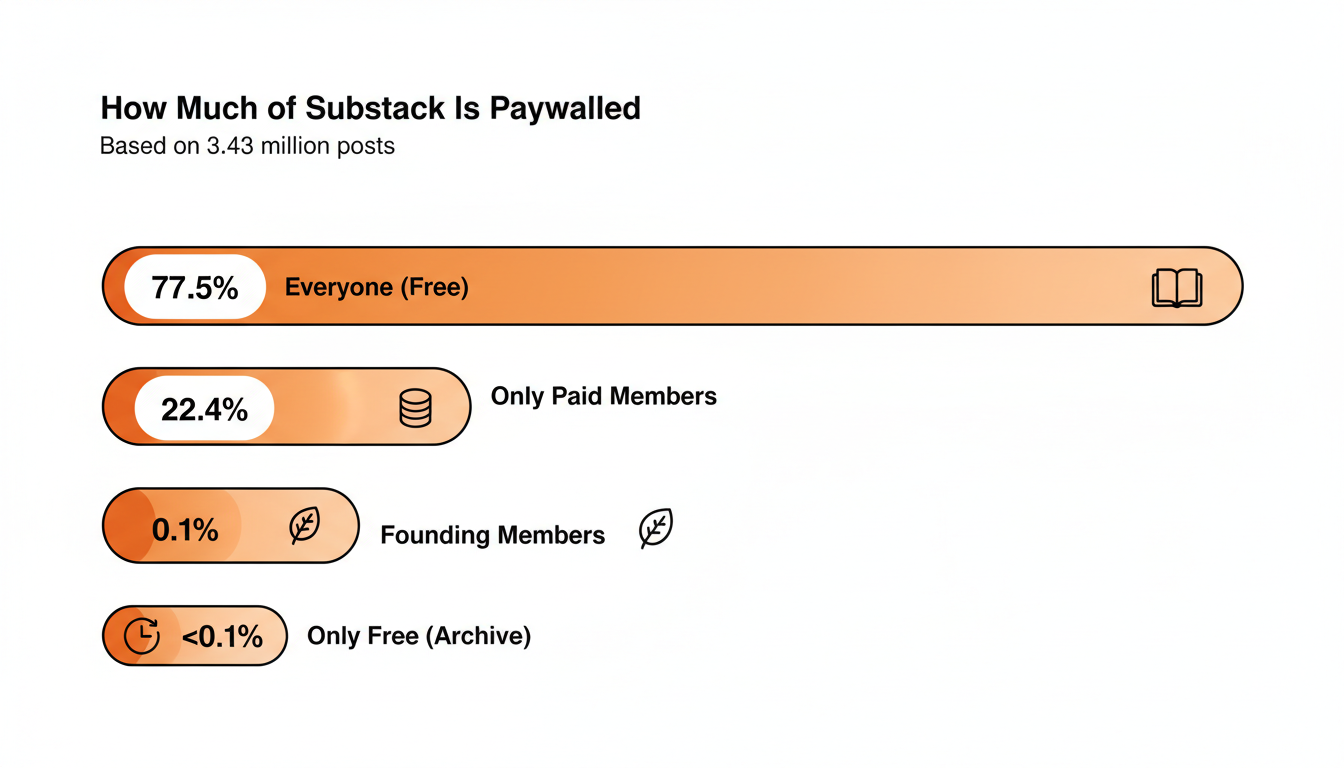
That roughly one-in-five ratio is a useful benchmark on its own. If you paywall far more or far less than 20% of your output, you're an outlier, and that changes how much a free trial can help. A trial does little for a newsletter that paywalls almost nothing, because there's no real barrier to remove. It matters more on newsletters that lock a meaningful share of their best material.
On the conversion side, Carrie's 2026 breakdown of Substack pricing models calls 2% to 5% "the commonly cited free-to-paid benchmark for newsletters." Substack doesn't publish trial conversion data, and I haven't seen a trustworthy public number for how much a trial moves that range. Treat a trial as a way to help readers who were already close to paying decide sooner. How much your paid content is worth to your free readers sets the ceiling.
Practical rule: if your free-to-paid conversion sits well under 2%, look first at whether free readers know what's behind the paywall, and whether the paid tier holds anything meaningfully different from the free one. A trial comes after those two.
When a Free Trial Backfires
A trial can actively hurt you in a few specific situations.
If your paid content is time-sensitive (a weekly market recap, a drop schedule, a cohort-based course), a seven-day trial lets a reader consume a full cycle of value and cancel before the first real charge. You've given away the thing you were trying to sell.
If your welcome emails don't say when the card will be charged, expect surprised readers and refund requests, and that costs you more in trust than the trial gained you in signups.
If you're already running a discount alongside the trial, you're stacking two objection-removal tools at once. That usually means you're guessing at the real objection.
There's also a quieter failure mode: trial fatigue among your most engaged readers. If someone has started and cancelled a trial once already, sending them the same offer again six weeks later tends to read as tone-deaf. Segment your trial promotions so past decliners get a different message, ideally one that speaks to why they said no the first time.
A Free Trial Launch Checklist
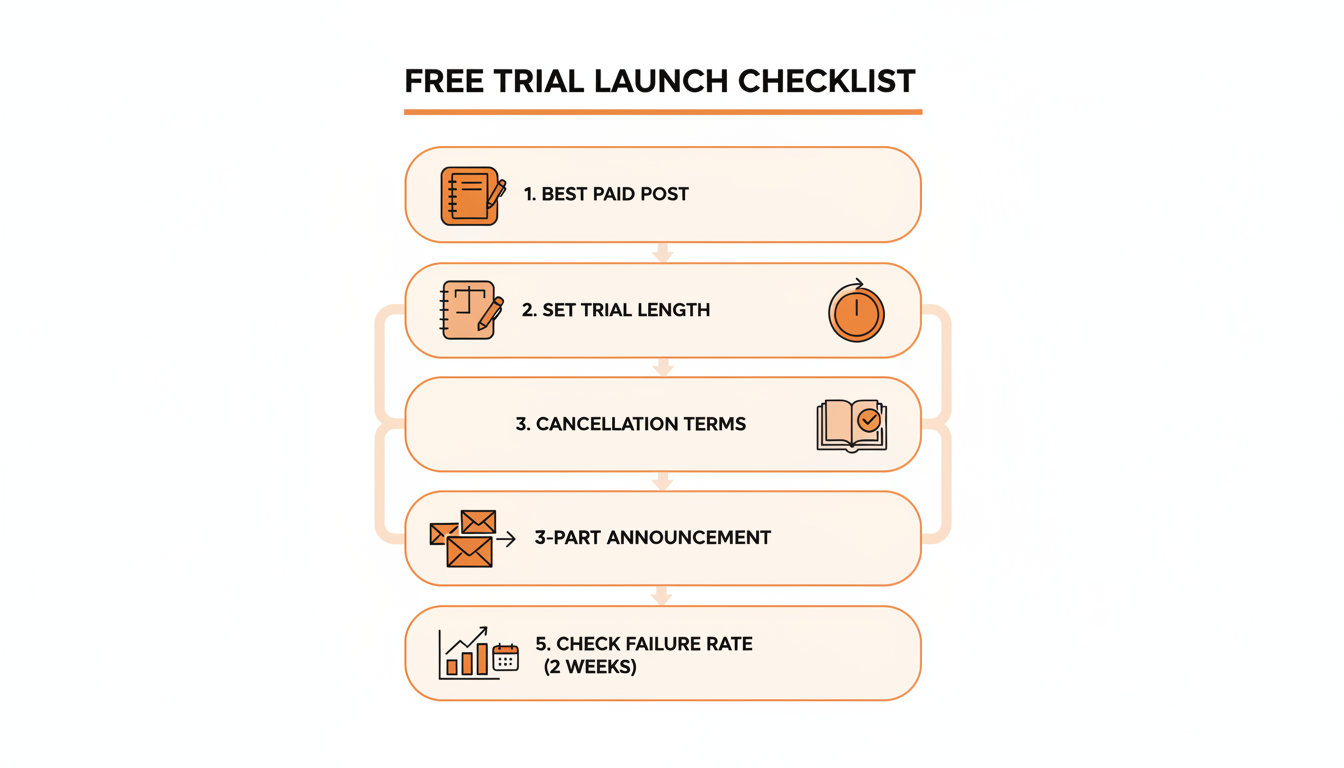
Before turning on a trial, work through this in order:
- Pick one paid post from the last month that free readers responded well to when previewed, and use it as your trial's centerpiece.
- Decide the trial length. The paywall toggle is fixed at 7 days. A special offer link shows readers its own length, so check the options in your dashboard and match them to your cadence.
- Write the cancellation steps and the charge date into the offer description itself, and repeat them in your welcome email.
- Build a short launch sequence: one Note announcing the trial link, one post explaining what's behind the paywall, one follow-up before the trial ends.
- Announce the trial link in a Note and schedule the follow-up Notes so the offer stays visible all week.
- Two weeks after the first trials end, check failed payments and cancellations as separate numbers.
Practical rule: treat the trial launch like a mini product launch. The toggle takes ten seconds. The messaging around it decides whether it converts.
Alternatives If You Skip the Free Trial
A free trial is optional, and plenty of newsletters convert well without one. If you haven't turned on payments yet, collect pledges before paid so you know who intends to pay. A free preview of your best paid post, sent straight to your whole free list, asks for zero commitment and often does more work than a trial. A time-limited discount tied to a real event, like an anniversary or a subscriber milestone, can create urgency with less churn risk. A founding member tier gives your biggest fans a way to pay more. And pitching the paid tier consistently and specifically in your posts remains the most underused lever most newsletters have.
If your concern is readers leaving over a break, you can also pause paid subscriptions on Substack while you're away. For more ways to grow the free list that feeds every one of these levers, see how to grow a Substack.
None of these need Substack's trial feature. They all run through your regular posts and Notes, so the real constraint is usually whether you show up often enough for any lever to get seen. A trial offer that goes out in a single email reaches a fraction of the people who see the same offer reinforced across a post, three Notes over the following week, and a mention in your next regular send.
Where WriteStack Fits
Whichever lever you choose, it only works if readers see the announcement. WriteStack schedules Substack Notes: you write the Notes that carry a trial launch, line them up in the queue, and WriteStack publishes them through Sync plus the Chrome extension. The heatmap shows how consistent your Notes have really been, and the Note Generator helps you draft the announcement sequence from your own past writing.
Announce your trial link in a Note and schedule the follow-ups with WriteStack. 7-day free trial, cancel anytime, from $19.99/mo billed annually. See WriteStack pricing.
FAQ
Does Substack have a free trial?
Not for Substack as a whole. There is no trial that unlocks every paid newsletter. Each writer can offer a free trial for their own publication: a 7-day trial at the paywall, or a special-offer trial link. You can run trials with several publications at once, but only one trial per publication on the same Substack account.
How does a Substack free trial work?
You choose one of the publication's plans and enter your card details. During the trial you can read that publication's paid posts and archive on the web and in the app. When the trial ends, Substack charges the plan you picked unless you cancel before the billing date.
How long is a Substack free trial?
The paywall trial is 7 days. A special-offer trial link can use the length the writer sets in Special offers, so check the offer screen for that length before you redeem it.
Is there a Substack free trial code?
Substack's help center describes trials as a paywall toggle or a link the writer creates under Settings, then Payments, then Special offers. It is not a code you type. Writers may see the trial show up as a coupon in the "New Paid Subscription" email.
I forgot to cancel my Substack trial. Can I get a refund?
Ask the writer first. Substack will also refund a request sent to Substack support within 7 days of the payment, unless you claimed a subscriber perk or the writer marked the subscription non-refundable. Cancelling alone does not refund a charge that already happened. iOS in-app purchases go through Apple.
How do I offer a free trial on my Substack?
Two ways under Settings, then Payments: switch on "Offer 7-day free trials in paywall", or open Special offers, create a new offer, choose Free trial under Terms, and share the link. Trial readers appear under Paid subscribers as a Free trials group. They count as paying subscribers there, but not in gross annualized revenue until they pay.
Can I get more than one free trial from the same Substack publication?
No. Substack's Help says you "cannot redeem a trial to a publication more than once under the same Substack account." Each publication is separate, so a trial with one writer doesn't use up a trial with another.
Can I be on free trials with several publications at once?
Yes. If several publications you want to read each offer a trial, Substack lets you redeem as many as you like at the same time. Each one charges separately when it ends, so track the end dates.
Can trial readers comment on paid posts?
Substack counts trial readers as paying subscribers and says they get the same access to paid posts and archives. On paywalled posts, comments are limited to paid subscribers, and free readers who haven't started a trial can only read the preview.
Does Substack take a fee during a free trial?
No money moves during the trial, so there is nothing to take a fee from. Once the trial converts, Substack keeps 10% of each subscription payment and Stripe charges its own processing fees, the same as any paid subscription.
Can a writer refund a reader who forgot to cancel?
Yes. Writers can cancel a subscriber from the Subscribers tab and choose a pro-rated or full refund of the most recent payment. Substack recommends issuing refunds there. A refund made directly in Stripe doesn't return Substack's 10% fee.
Sources
All checked on 9 Nov 2026.
- Substack Help: Can I add a free trial offer to a paywall on my post?
- Substack Help: How do I offer a free trial to my publication?
- Substack Help: How do I redeem a free trial on Substack?
- Substack Help: How do I cancel my paid subscription on Substack?
- Substack Help: Will my paid subscription automatically renew on Substack?
- Substack Help: What is Substack's refund policy?
- Substack Help: How do I cancel a subscription and issue a refund for a paid subscriber on Substack?
- Substack Help: What is a Substack Bestseller badge?
- Substack Help: How much does Substack cost?
- Carrie, Thrive with Carrie: Substack pricing models 2026